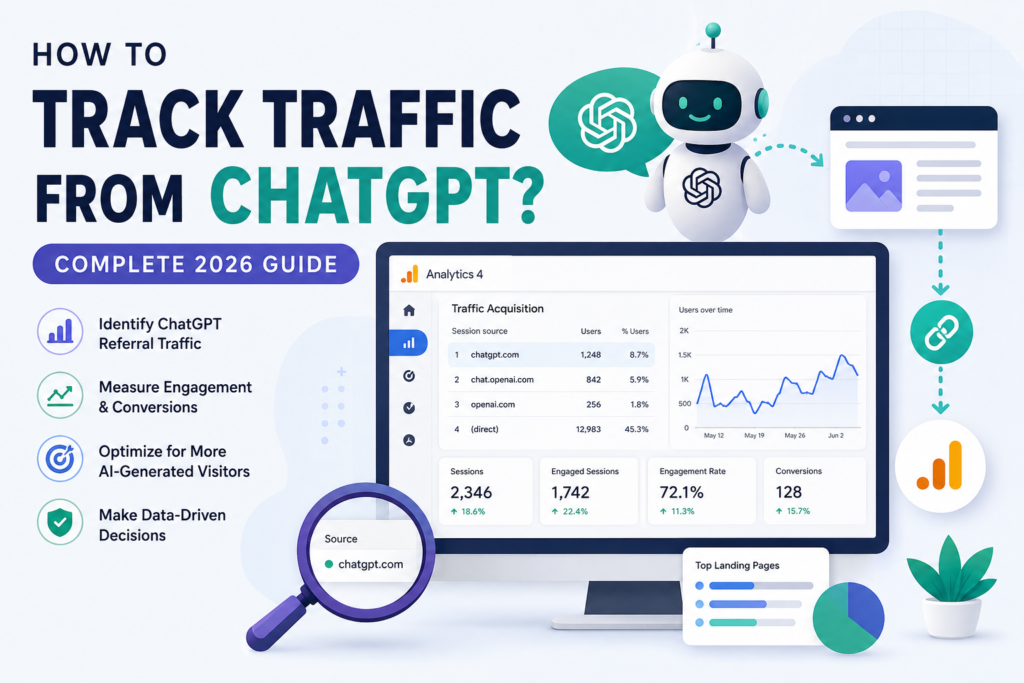
Yes, you can track traffic coming from ChatGPT. Google Analytics 4 can spot many AI referrals, including ChatGPT, Gemini, Copilot, and Perplexity. But here’s the catch: not every visit shows up clean. Some AI traffic hides in your “direct” numbers, and I’ll show you how to find it.
If you’ve been checking your analytics and wondering why you can’t see any ChatGPT visitors, you’re not alone. A lot of site owners assume AI traffic just isn’t happening for them. In most cases, it’s happening. You just don’t know where to look yet.
Let’s fix that.
Quick Answer for Impatient Peoples
You can track ChatGPT traffic in GA4 by checking your Traffic Acquisition report and looking for sources like chatgpt.com or chat.openai.com. Not all AI traffic shows up as a clear referral though. Some of it gets counted as direct traffic because of how browsers and privacy settings handle the data. To get the full picture, you need to combine referral tracking, UTM parameters, and conversion data.
What Counts as ChatGPT Traffic?
ChatGPT traffic is any visitor who clicks a link that ChatGPT gave them and lands on your site. It sounds simple. But the tracking behind it gets messy fast.
Here’s the basic flow. A user asks ChatGPT a question. ChatGPT answers and includes a link to your page. The user clicks it. Their browser sends referral information to your site, and Google Analytics logs it.
User → ChatGPT → Website Link → Google Analytics → Reports
That’s the ideal path. In reality, a chunk of this data goes missing along the way.
The biggest confusion I see is people mixing up “direct traffic” with “AI traffic.” They’re not the same thing. Direct traffic just means GA4 couldn’t figure out where the visitor came from. Some of those visitors came from ChatGPT. GA4 just lost the trail.
Does ChatGPT Always Pass Referral Data?
No, it doesn’t. Referral data depends heavily on how someone opens your website after chatting with ChatGPT.
Sometimes the referral data comes through perfectly. Other times it vanishes, and the visit gets logged as direct traffic instead. This isn’t a bug. It’s just how web tracking works across different apps and browsers.
A few things affect this:
- Browser behavior: Some browsers strip referral headers for privacy reasons
- Mobile apps: The ChatGPT mobile app doesn’t always pass referral data the same way a browser does
- Shared links: If someone copies a link from ChatGPT and pastes it elsewhere, the referral gets lost
- Privacy limitations: Ad blockers and privacy extensions can block referral tracking entirely
I’ve seen this play out with client sites. One month, referral traffic from ChatGPT looked flat. But conversions from “direct” traffic jumped. That’s usually a sign AI traffic is hiding in plain sight.
How to Track ChatGPT Traffic in Google Analytics 4
Step 1: Open Your Traffic Acquisition Report
Start here. It’s the easiest place to spot AI referrals without any setup.
Go to Reports → Acquisition → Traffic Acquisition in your GA4 dashboard.
This report shows you every traffic source hitting your site, sorted by session count. Look through the list for anything AI-related. It won’t always be labeled obviously, so you need to know what to search for.
Step 2: Search for ChatGPT
Once you’re in the report, search for these terms:
- chatgpt.com
- chat.openai.com
- openai.com
These are the domains most likely to show up when ChatGPT sends someone your way. Keep in mind these can change over time as OpenAI updates its systems, so it’s worth checking back every few months.
If you don’t see any of these, don’t panic. It just means the referral data isn’t clean, not that you have zero AI traffic.
Step 3: Create an AI Traffic Exploration
For a clearer picture, build a custom exploration in GA4. This lets you isolate AI sources instead of hunting through the general report every time.
Here’s what to include:
- A custom segment filtered by Session Source containing chatgpt, openai, gemini, or perplexity
- Referral traffic as the primary dimension
- Landing pages to see which content AI tools send people to
- Engagement metrics like session duration and pages per session
This one report alone will tell you more than any single traffic number. Once you build it, you can revisit it weekly without redoing the setup.
How to Identify AI Traffic Beyond ChatGPT
ChatGPT isn’t the only AI assistant sending visitors your way. If you only track ChatGPT, you’re missing a big part of the picture.
Here’s a simple reference table:
| AI Platform | Possible Referral |
|---|---|
| ChatGPT | chatgpt.com |
| Gemini | gemini.google.com |
| Copilot | copilot.microsoft.com |
| Perplexity | perplexity.ai |
| Claude | claude.ai |
| Meta AI | Various Meta domains |
I always recommend tracking all of these together, not just ChatGPT. Why? Because AI search behavior overlaps a lot. Someone might ask the same question on ChatGPT one day and Perplexity the next. If you only watch one platform, you’ll underestimate your total AI traffic by a wide margin.
Combining these sources into one dashboard view gives you a much more honest number. It also helps you spot trends, like which platform is sending you the most engaged visitors.
Track AI Traffic Using UTM Parameters
UTM parameters give you more control, but only in specific situations.
If you’re sharing links directly (in newsletters, social posts, or anywhere you control the URL), you can tag them like this:
utm_source=chatgpt
utm_medium=ai
utm_campaign=content
This helps if you’re intentionally promoting content meant to get picked up by AI tools. It won’t help with links ChatGPT generates on its own, though. You have no control over those URLs, so UTM tagging doesn’t apply there.
Think of UTMs as a tool for your own campaigns, not a fix for organic AI referrals. They work great for tracking things like “did my LinkedIn post about this guide get picked up and shared through AI conversations.”
Measure More Than Just Visits
Traffic numbers alone don’t tell you much. I’ve seen sites with decent AI traffic and zero business results, and sites with smaller AI traffic that converts really well.
Focus on these instead:
- Engaged sessions: Are people actually reading, or bouncing immediately?
- Average engagement time: How long do AI visitors stick around compared to search visitors?
- Scroll depth: Are they reading the full page or just the intro?
- Lead form submissions: Is this traffic turning into actual leads?
- Purchases: Are AI visitors buying anything?
- Newsletter signups: Are they sticking around long term?
- Demo bookings: For B2B sites, this is often the real signal
Here’s my honest take: conversions matter way more than raw visit counts. A hundred AI visitors who convert at 5% beat a thousand who bounce in three seconds. Don’t get caught up chasing traffic numbers for the sake of it.
How to Build an AI Traffic Dashboard
Once you’ve got the basics tracked, pull everything into one dashboard. This saves you from digging through five different reports every time you want an update.
Include these widgets:
- AI sessions (total, by platform)
- AI conversions
- Top landing pages for AI traffic
- Revenue attributed to AI sources
- Engagement rate
- Returning users from AI sources
- Device breakdown (mobile vs desktop)
I built one of these for a client last year, and it changed how they thought about content. They realized their FAQ pages were pulling in way more AI traffic than their blog posts. That single insight shifted their entire content plan for the next quarter.
Why Some ChatGPT Traffic Appears as Direct
This is probably the most misunderstood part of AI traffic tracking. A lot of your ChatGPT visitors are hiding inside your direct traffic numbers right now.
Here’s why this happens:
- Referral stripped: Some apps and browsers remove referral data before it reaches your site
- HTTPS transitions: Moving from a secure to non-secure page (or vice versa) can wipe referral info
- Browser privacy settings: Safari and some Chrome settings limit what gets passed along
- Mobile apps: In-app browsers often don’t send full referral data
- Copy-paste URLs: If someone copies a link instead of clicking it, there’s no referral at all
- Incognito sessions: Private browsing modes block a lot of tracking by default
So when you see a spike in direct traffic with no clear explanation, ask yourself: did I also see a spike in engagement or conversions around the same time? If yes, there’s a decent chance some of that “direct” traffic is actually coming from AI tools.
This is the part most site owners miss completely. They look at referral numbers, see something small, and conclude AI traffic isn’t happening for them. The truth is usually more complicated.
Best Pages That Attract ChatGPT Traffic
Not all content gets picked up equally by AI tools. Some formats do much better than others.
Pages that tend to attract AI citations:
- Ultimate guides that cover a topic in full depth
- Original research with real data and numbers
- Statistics pages that are easy to reference
- Step-by-step tutorials with clear instructions
- Comparison articles (X vs Y format)
- FAQ pages with direct question and answer formatting
- Glossaries that define terms clearly
- Case studies with real results
- Industry reports with credible sourcing
Why does this pattern hold up? AI tools like ChatGPT are built to answer questions directly. They favor content that’s already structured like an answer. If your page rambles for three paragraphs before getting to the point, it’s harder for AI to pull from it.
This is exactly why FAQ sections and direct-answer formatting matter so much right now. It’s not just good for readers. It’s good for how AI reads your content too.
How to Increase ChatGPT Traffic
If you want more AI traffic, you need to make your content easier for AI to find, understand, and trust.
Here’s what actually works:
- Write answer-first content. Put the direct answer near the top, not buried in paragraph six.
- Add FAQ sections. These map almost perfectly to how people phrase questions in ChatGPT.
- Publish original research. AI tools love citing unique data they can’t find anywhere else.
- Use descriptive headings. Clear H2s and H3s help AI understand your page structure.
- Improve EEAT. Experience, expertise, authority, and trust still matter, even for AI search.
- Build topical authority. Cover a topic from multiple angles instead of one thin post.
- Add internal links. This helps both search engines and AI tools understand your site’s depth.
- Keep content updated. Stale content gets replaced by fresher sources over time.
- Earn citations from trusted websites. Getting mentioned elsewhere builds credibility signals AI tools pick up on.
None of this is a quick fix. It’s a long game, similar to traditional SEO but with a different set of rules layered on top.
Common Mistakes When Measuring ChatGPT Traffic
I see the same mistakes over and over when people start tracking AI traffic. Here’s what to watch out for:
- Looking only at referral traffic. This misses everything hiding in direct traffic.
- Ignoring conversions. Traffic without context tells you almost nothing.
- Not creating GA4 explorations. The default reports aren’t built for AI-specific tracking.
- Mixing AI traffic with search traffic. These are different behaviors and should be tracked separately.
- Assuming all direct traffic is human. A chunk of it isn’t.
- Ignoring server logs. Logs sometimes catch traffic GA4 misses entirely.
- Tracking only sessions. Sessions without engagement data don’t tell the full story.
If you’re making even two or three of these mistakes, your AI traffic numbers are probably way off from reality.
Can You Track AI Mentions Without Traffic?
Yes, and this matters more than people think. Getting mentioned by ChatGPT doesn’t always mean someone clicks through to your site. Sometimes ChatGPT just answers using your info without sending a visitor at all.
Ways to track this:
- Brand monitoring tools that alert you when your brand or content gets referenced
- AI citation tools built specifically to track how often AI tools cite your pages
- Server logs that can show AI crawler activity even without a click-through
- Search Console for indirect signals, though it has real limitations here
- AI visibility platforms that are starting to specialize in this exact problem
This is honestly an area worth watching closely over the next year. AI citation tracking is still pretty new, and the tools are improving fast. Being cited without traffic still builds brand trust, even if it doesn’t show up in your analytics.
How Pratsify Helps Businesses Grow AI Traffic
Tracking AI traffic is one piece of the puzzle. Actually growing it is the harder part.
This is where I come in. At Pratsify, I work with businesses to build real AI visibility, not just guesswork. That includes:
- AI Visibility Audits to see where you currently stand
- AEO Strategy built around how AI tools actually source answers
- GEO Optimization to improve your odds of getting cited
- AI Content Architecture designed for both readers and AI tools
- Citation Optimization to earn trust signals AI tools rely on
- AI Analytics Setup so you can actually measure what’s working
- Technical SEO for AI Crawlers to make sure your site is accessible
- Authority Building to strengthen your brand’s credibility over time
If your website isn’t getting measurable traffic from ChatGPT, Gemini, or Perplexity, that’s usually fixable. Pratsify helps businesses optimize content, improve AI visibility, and set up analytics that actually show how AI visitors find and engage with your site.
Summary
ChatGPT traffic is measurable, but not perfectly. GA4 can identify a good chunk of AI referrals, but plenty still hides in your direct traffic numbers.
Track conversions, not just visits. Traffic without engagement doesn’t tell you much about real business impact.
Combine analytics with AI optimization if you actually want to understand your true reach. One without the other only gives you half the story.
Businesses that monitor and optimize AI traffic early are going to have a real advantage. AI assistants are only going to send more visitors over time, not fewer. The sooner you get your tracking right, the sooner you can act on what it tells you.
Frequently Asked Questions
Can Google Analytics detect ChatGPT traffic?
Yes, in many cases. GA4 can identify referral sources like chatgpt.com in your Traffic Acquisition report. It won’t catch every visit though, since some referral data gets lost along the way.
Why is ChatGPT traffic showing as direct?
This happens when browsers or apps strip referral information before it reaches your site. Mobile apps, privacy settings, and copy-pasted links are common causes.
Does Search Console show ChatGPT traffic?
Not directly. Search Console focuses on Google Search performance, not AI assistant referrals. It’s not built for this kind of tracking yet.
Can I track ChatGPT conversions?
Yes. Set up conversion events in GA4 and filter by your AI traffic segment. This shows you exactly how many AI visitors turn into leads or customers.
Which AI platforms send the most referral traffic?
This varies by industry, but ChatGPT, Gemini, and Perplexity tend to be the biggest sources right now. It’s worth checking your own data instead of assuming.
Can I create a GA4 report just for AI visitors?
Yes. Build a custom exploration filtered by session source, using domains like chatgpt.com, gemini.google.com, and perplexity.ai.
Does ChatGPT traffic improve SEO?
Not directly, but engaged AI traffic can boost signals like time on site and conversions, which indirectly support your overall SEO performance.
What is the best way to measure AI search performance?
Combine referral tracking, conversion data, and citation monitoring. No single tool gives you the full picture on its own right now.