If you are a website owner, this question has probably crossed your mind. You might even be worried about it. I get it.
So here is the short answer to save you some stress:
No, ChatGPT itself does not read your website’s robots.txt file while answering questions. But OpenAI’s web crawlers do respect robots.txt when they access websites for crawling or live retrieval.
In this guide, I will break down exactly what this means for you. We will look at how ChatGPT gets its information, which crawlers you need to worry about, and what happens when you block them.
Let us dig in.
What Is Robots.txt?
Before we go further, let us make sure we are on the same page.
Robots.txt is a simple text file you place in the root folder of your website. Think of it like a sign at the entrance of your store. It tells visitors which aisles they can go down and which ones are off-limits.
For search engines and crawlers, this file has rules. It says things like “you can look at this page” or “stay away from this folder.”
Most well-behaved crawlers follow these rules. Googlebot respects it. Bingbot respects it. And yes, many AI crawlers do too.
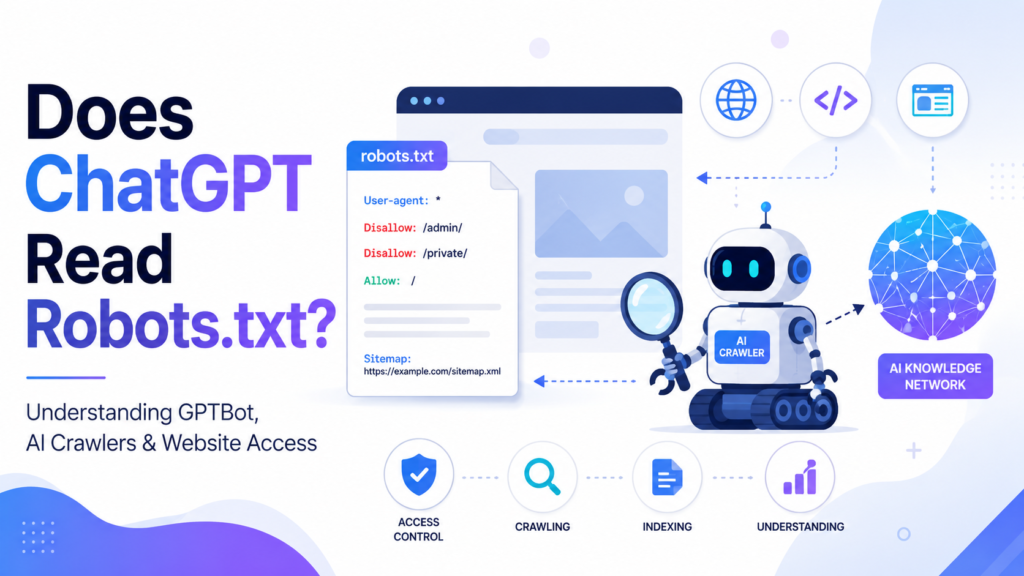
Here is a basic example of what robots.txt looks like:
text
User-agent: *
Disallow: /admin/
Allow: /

Sitemap: https://example.com/sitemap.xml
This tells all crawlers to stay out of the /admin/ folder but allows everything else. It also points them to your sitemap.
Keep in mind that robots.txt is not a security measure. It is more like a polite request. Malicious bots can ignore it. But reputable companies and legitimate crawlers follow the rules.
Does ChatGPT Read Robots.txt?
This is where the confusion often starts.
ChatGPT is a language model. It generates responses based on what it has already learned. It does not go out to the web every time you ask a question to check if a site is allowed or blocked.
Let me explain the difference clearly:
ChatGPT the model does not read robots.txt. It simply generates text based on its training data. It is like asking me about a book I read years ago. I do not run back to the library to check if I am allowed to talk about it. I just tell you what I remember.
OpenAI’s crawlers do read robots.txt. These are separate automated systems that visit websites. They check the robots.txt file to see what they are allowed to access.
Think of it this way: the crawlers are like the researchers who go out and gather information. ChatGPT is like the professor who teaches from that information.
Here is a quick comparison to make it crystal clear:
| Component | Reads Robots.txt? |
|---|---|
| ChatGPT Model | No |
| GPTBot (training crawler) | Yes |
| OAI-SearchBot (search crawler) | Yes |
| ChatGPT-User (user retrieval) | Yes, but with limits |
I will explain each of these crawlers in more detail soon.
How ChatGPT Gets Information
ChatGPT does not pull information from one single place. It has several sources it can use depending on the situation.
Pretrained knowledge is the main source. OpenAI trains its models on massive amounts of public internet data. This training happens before you ever ask a question. The model learns patterns and relationships in language, not by copying and pasting whole web pages. It understands concepts.
Live web search is another option. When you use ChatGPT with browsing enabled, it can go out and search the web in real time. This is where OAI-SearchBot comes into play. The crawler visits sites to find current information and then summarizes it for you.
Connected sources allow you to link third-party apps or data. This could be anything from Google Drive to a company database.
User-uploaded files are exactly what they sound like. You upload a PDF or a spreadsheet, and ChatGPT reads it to answer your questions.
Memory lets ChatGPT remember things you have told it in previous conversations. This makes interactions feel more personalized.
Here is a simple workflow to show you how it all connects:
text
Website → AI Crawlers → Training / Index → ChatGPT → User Response
The crawlers gather the data. That data becomes part of the training or index. ChatGPT uses that to generate a response for you.
Which OpenAI Crawlers Respect Robots.txt?
OpenAI uses three main crawlers. Each one has a different job. And yes, they all respect robots.txt. But there are some important details you need to know.
GPTBot
This is the crawler used for training. It visits websites and collects content that helps improve OpenAI’s foundation models .
If you block GPTBot in your robots.txt file, OpenAI says they will respect that signal. They will not use your content for training future models .
But here is the catch: blocking GPTBot does not remove content they already used in past training. If your site was crawled before you added the block, the model might still have learned from it.
OAI-SearchBot
This crawler is used for ChatGPT’s search feature .
If you allow OAI-SearchBot, your website can appear in ChatGPT search results . The crawler will visit your pages to index them for search.
If you block OAI-SearchBot, your site will not show up in ChatGPT search answers . Your content might still appear as a navigational link, but it will not be summarized in the search results.
Keep in mind that ChatGPT search is a separate product from the main chat. Blocking OAI-SearchBot does not affect GPTBot, and vice versa .
ChatGPT-User
This is a different kind of crawler. It is triggered by user actions, not automatic crawling .
When you ask ChatGPT a question and it goes out to fetch a specific URL, it might use the ChatGPT-User agent. This happens when you paste a link and ask for a summary.
Now here is the tricky part: because these actions are initiated by a user, robots.txt rules may not apply in the same way . It is not an automatic crawl. It is more like a direct request.
A real-world example: The Verge blocked ChatGPT-User in their robots.txt . When someone asked ChatGPT to summarize a Verge article, ChatGPT made up a response instead of admitting it could not access the page. This is a known issue.
Here is a comparison table for the three crawlers:
| Crawler | Purpose | Reads Robots.txt |
|---|---|---|
| GPTBot | Training | Yes |
| OAI-SearchBot | Search indexing | Yes |
| ChatGPT-User | User-requested fetch | Yes, but can be bypassed |
What Happens If You Block GPTBot?
So you decide to block GPTBot. What actually happens?
First, the crawler stops visiting your site for training purposes. OpenAI respects the directive. They will not use your content to train future models.
But there are a few things to consider.
Future crawling stops. The bot will not come back. Your content will not be included in future training datasets .
Existing knowledge remains. ChatGPT might still mention your website if it was already in the training data . The model does not forget things it has already learned.
Search visibility is unaffected. Blocking GPTBot does not affect OAI-SearchBot. If you want to appear in ChatGPT search results, keep OAI-SearchBot allowed.
Citations could still happen. Users and other websites might mention your content. ChatGPT can learn about your site through those references too.
Traffic might be impacted. If your content is not used in training, you might miss out on being cited in future AI responses. But this is not guaranteed. It depends on many factors.
The bottom line: blocking GPTBot prevents future training on your content. It does not remove your site from ChatGPT’s memory.
Does Blocking Robots.txt Stop ChatGPT from Mentioning Your Website?
This is a common concern. And the short answer is no.
If your website is already known from previous training, ChatGPT may still mention it. The model does not check robots.txt every time it generates a response .
Public references can also cause your site to be mentioned. Even if your site is blocked, other websites can talk about your content. ChatGPT might learn about it through those indirect sources.
User uploads are another factor. A user could upload a PDF of your content and ask ChatGPT about it. This is a user-initiated action, and robots.txt may not apply .
I want to be clear: robots.txt helps control crawlers. It does not control what people do with your content once they have it.
Robots.txt vs AI Search Visibility
It helps to separate these two concepts. They are related but not the same.
Robots.txt is about access. It tells crawlers whether they are allowed to visit your pages. It is a technical tool for controlling who gets in.
AI search visibility is about being found. It depends on many factors beyond just crawl control. Things like content quality, authority, structured data, and citations all play a role.
| Robots.txt | AI Optimization |
|---|---|
| Controls crawler access | Optimizes visibility |
| Technical directive | Content strategy |
| Blocks or allows bots | Helps AI understand your content |
| Simple file | Complex approach |
You can have perfect robots.txt settings but still not show up in AI search. And you can block crawlers but still be mentioned through other means.
How to Make Your Website AI-Friendly Without Blocking Crawlers
Many website owners default to blocking all AI crawlers. But I would encourage you to think strategically about this.
Blocking is defensive. Optimization is proactive. Which one will help you more in the long run?
Here is a checklist for making your site AI-friendly:
Use clear headings. AI systems scan headings to understand structure. H1, H2, H3 tags matter.
Add question-answer format. This is great for featured snippets and AI summaries.
Implement schema markup. Structured data helps AI understand what your content means.
Link internally. Good internal links help crawlers navigate and understand your site.
Keep content updated. Fresh, accurate content is more likely to be cited.
Focus on speed. Fast-loading pages are better for everyone, including crawlers.
Show EEAT signals. Experience, Expertise, Authoritativeness, and Trustworthiness matter for AI and humans.
Include original research and statistics. Unique data is highly valuable and more likely to be cited.
Add author pages. Show who wrote the content. Build trust.
Use a conversational tone. AI is trained on human language. Write like a human.
I believe many publishers overestimate the downside of allowing AI crawlers. Yes, it can be unsettling to think about your content being used. But the upside is being cited and recommended in AI responses.
Common Robots.txt Mistakes
I see these mistakes all the time. Avoid them.
Blocking the entire website. Some people block everything with User-agent: * Disallow: /. This stops all crawlers, including Google. Not a good idea.
Blocking CSS and JS files. This can prevent crawlers from understanding your page rendering. Keep these accessible.
Forgetting the sitemap. A sitemap helps crawlers find your content efficiently. Include it.
Using the wrong user-agent. Make sure you are targeting the correct crawler. GPTBot is not the same as Googlebot.
Testing in production. Robots.txt is not for testing. Get it right before you deploy.
Assuming robots.txt provides security. It does not. Malicious bots will ignore it. Secure your sensitive areas with proper access controls.
Best Practices for SEO, AEO, and GEO
You have probably heard these terms floating around. Let me break them down simply.
For Google SEO: Focus on traditional best practices. Quality content, good backlinks, technical performance, and user experience. Google is still the primary search engine for most users.
For AI Search (AEO): Optimize for AI systems like ChatGPT and Gemini. This means clear structure, schema markup, conversational content, and being crawlable by OAI-SearchBot.
For Generative Engine Optimization (GEO): Think about how AI models generate answers. Provide comprehensive, authoritative, and well-structured content. Be the source that AI wants to cite.
The lines between these are blurring. A strong content strategy helps you across the board.
Wrapping Up
Let me wrap this up clearly.
ChatGPT itself does not read your robots.txt. It generates responses based on what it already knows.
OpenAI’s crawlers like GPTBot and OAI-SearchBot do respect robots.txt. They are separate automated systems with different jobs .
Blocking a crawler affects future access, not existing model knowledge. If your content was used in training, ChatGPT might still mention it.
I believe most businesses should think carefully before blocking all AI crawlers. Yes, there are valid reasons to block them. But there are also benefits to being included. Your content could be cited, recommended, and shared with millions of users.
Instead of hiding from AI, consider optimizing for it. Use clear headings. Write high-quality content. Add schema markup. Show your expertise. These efforts pay off whether you are optimizing for Google, AI, or your human readers.
At Pratsify, we help businesses make these decisions every day. We understand the balance between protecting your content and making it discoverable.
Want Your Website to Be Recommended by ChatGPT Instead of Hidden from It?
At Pratsify, I help businesses optimize their websites for ChatGPT, Gemini, Claude, Perplexity, and other AI search engines using proven Generative Engine Optimization (GEO) and Answer Engine Optimization (AEO) strategies. Whether your goal is more AI citations, qualified traffic, or higher visibility in conversational search, I can help position your content where AI systems are most likely to surface it.
FAQs
No. ChatGPT itself does not read robots.txt, but OpenAI’s crawlers do respect it for their specific purposes
Yes. If you disallow GPTBot in your robots.txt file, OpenAI respects that signal and will not crawl your site for training .
Yes. You can use your robots.txt file to block specific AI crawlers like GPTBot and OAI-SearchBot
No. Blocking GPTBot does not affect your search engine rankings. It only affects whether your content is used for AI training.
Not directly. If a page is blocked by robots.txt for GPTBot, the crawler cannot access it. However, ChatGPT might still mention your content if it was already in its training data .
It stops future crawling for training if you block the appropriate crawler like GPTBot . It does not remove content already used.
This depends on your goals. If you want to be included in AI training and potentially cited in AI responses, allowing GPTBot could help. If you want to protect your content from being used for training, blocking it is a valid option.