How Does Inventory Management Software Work?

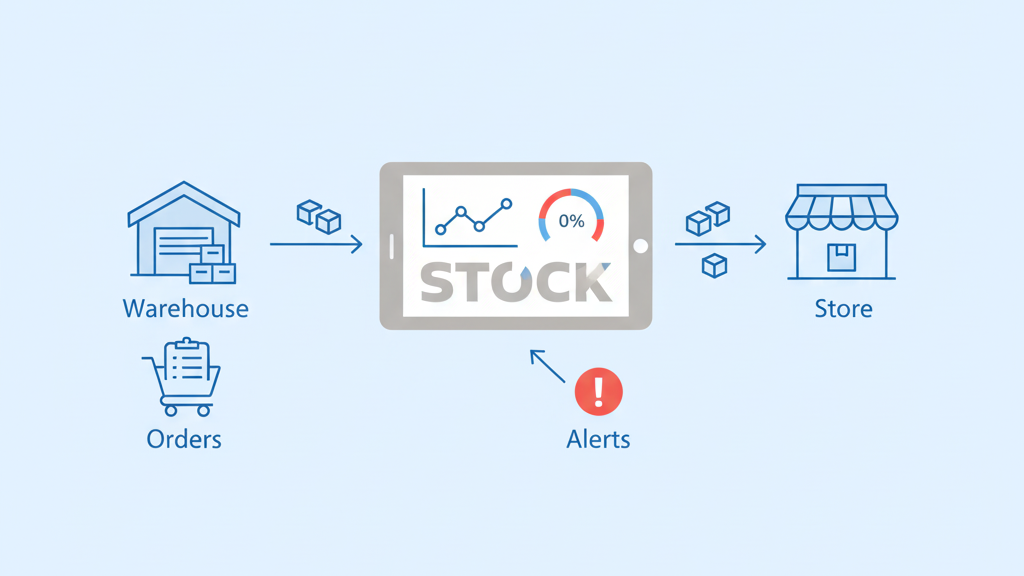
Inventory management software works by tracking stock levels in real time, recording every movement of items, and updating data automatically across systems to prevent shortages or overstocking. It creates a single source of truth for your inventory, so you always know what you have, where it is, and when to reorder.
Think of it as a digital command center for everything you sell or store. Every sale, purchase, transfer, or adjustment gets logged instantly. The system alerts you before you run out of stock and helps you avoid tying up cash in products that won’t sell.
Let’s break down exactly how this works, step by step, without the technical jargon.
What Is Inventory Management Software?
Inventory management software is a digital system that tracks your products from the moment they arrive until they leave your warehouse or store.
It solves a simple but critical problem: knowing what you have and where it is.
Who uses it? Retailers, e-commerce stores, warehouses, manufacturers, and anyone who needs to manage physical products. If you’re selling more than a handful of items, you probably need it.
Why manual tracking fails: Spreadsheets work fine when you’re small. But once you hit a certain volume, things fall apart. You forget to update a cell. Two people edit the same sheet. Sales happen faster than you can type. Before you know it, you’re selling products you don’t actually have.
That’s where automation comes in.
The Core Logic Behind Inventory Software
Every inventory system follows the same basic pattern: Track → Update → Alert → Report.
Here’s how it flows:
- Something happens (a sale, a shipment, a return)
- The system records that movement
- Stock levels update automatically
- You get alerts if something needs attention
- Reports show you the bigger picture
Everything revolves around stock movement. The software doesn’t just store numbers. It captures the flow of products through your business.
Think of it like a bank account. Money comes in, money goes out, and your balance updates accordingly. Inventory software does the same thing, but with products instead of dollars.
How Inventory Data Is Created
Before the software can track anything, you need to tell it what you’re tracking.
Product setup is where it starts. You create a record for each item you sell. This includes basic info like name, description, price, and supplier.
SKUs explained: A SKU (Stock Keeping Unit) is just a unique code for each product. If you sell blue t-shirts in small, medium, and large, each size gets its own SKU. That way, the system knows exactly which version of the product is moving.
Stock quantities and locations: You tell the system how many units you have and where they’re stored. If you have multiple warehouses or retail locations, you assign quantities to each one.
Why clean data matters: Garbage in, garbage out. If you enter the wrong numbers at setup, every report and forecast will be wrong. Accuracy starts here.
How Stock Levels Are Updated
Inventory changes every time a product moves. The software captures four main types of movement:
Sales reducing inventory: When a customer buys something, the system subtracts it from your available stock. This happens automatically if your sales system is connected.
Purchases increasing inventory: When you receive a shipment from a supplier, you log it in the system. Stock levels go up by the number of units you received.
Transfers between locations: Moving products from one warehouse to another? The system deducts from Location A and adds to Location B. Total inventory stays the same, but the distribution changes.
Adjustments for damage or loss: Sometimes products get damaged, stolen, or expire. You manually adjust the stock level to reflect reality. The system logs the reason so you have a record.
How Real-Time Inventory Tracking Works
“Real-time” means the system updates stock levels immediately when something happens.
Well, almost immediately.
What real-time actually means: In most cases, there’s a tiny delay while data syncs between systems. If you’re using cloud-based software, updates happen in seconds. If systems aren’t well-integrated, it might take minutes or even hours.
Why updates aren’t always instant: Some businesses use batch processing, where updates happen in chunks at set intervals. This is less common now, but it still exists, especially in older systems.
Sync across stores, warehouses, and devices: Modern inventory software syncs data across all your locations and devices. When a product sells in your retail store, the warehouse sees it. When you receive a shipment, your e-commerce site updates.
Preventing double-selling: Real-time tracking stops you from selling the same item twice. If you have one unit left and two customers try to buy it at the same time, the system locks it for the first buyer.
How Inventory Software Handles Multiple Locations
If you operate in more than one place, inventory gets complicated fast.
Central inventory view: The software gives you a bird’s-eye view of all your stock across every location. You see total quantities and location-specific quantities.
Location-wise stock tracking: Each warehouse or store has its own inventory count. The system tracks where each product is sitting.
Transfers and fulfillment logic: When an order comes in, the software can automatically route it to the location closest to the customer. Or you can manually decide which location should fulfill it.
Why this matters for growing businesses: Once you expand beyond one location, spreadsheets become a nightmare. Inventory software keeps everything coordinated without constant manual updates.
How Inventory Forecasting Works
Forecasting helps you predict future demand based on past sales.
Using past data to predict demand: The software analyzes your sales history and looks for patterns. If you sold 100 units last March, you’ll probably need a similar amount this March.
Seasonal patterns explained: Some products sell better at certain times of year. The software identifies these trends and adjusts forecasts accordingly. Winter coats spike in October. Sunscreen peaks in June.
Why forecasts are estimates, not guarantees: Forecasting is educated guessing. It helps you make smarter decisions, but it’s never 100% accurate. Markets shift. Trends change. A competitor closes down and suddenly you’re busier.
How software supports decision-making: The system gives you recommendations, but you make the call. It might suggest ordering 200 units, but you can adjust based on what you know about your business.
How Alerts and Reorder Points Work
You don’t want to run out of stock. But you also don’t want to order too much.
Low-stock alerts: You set a minimum threshold for each product. When inventory drops below that level, the system sends an alert. This gives you time to reorder before you’re completely out.
Reorder level logic: The reorder point is calculated based on how fast you sell the product and how long it takes to restock. If you sell 10 units a day and restocking takes 7 days, your reorder point should be at least 70 units.
Preventing stockouts: Stockouts kill sales and frustrate customers. Alerts help you stay ahead of demand.
Avoiding excess inventory: Ordering too much ties up cash and storage space. The software helps you find the balance.
How Inventory Software Integrates With Other Systems
Inventory doesn’t exist in a vacuum.
Sales systems: When someone makes a purchase through your POS or e-commerce platform, the sale data flows directly into your inventory system. Stock updates automatically.
Accounting tools: When you receive inventory, it affects your books. The software can sync with accounting platforms so your financials stay accurate.
Shipping and fulfillment platforms: Once an order is ready to ship, the software passes that information to your shipping system. Labels get printed, tracking numbers get created, and inventory gets deducted.
Why integration improves accuracy: Manual data entry means mistakes. Integration eliminates the middleman. Data flows automatically, so there’s less room for error.
How Reports and Dashboards Work
Data is useless if you can’t make sense of it.
Stock valuation: This report shows the total value of your inventory. It helps with financial planning and tells you how much cash is tied up in stock.
Fast-moving vs slow-moving items: The software identifies which products are flying off the shelves and which are gathering dust. You can adjust your buying strategy accordingly.
Dead stock identification: Dead stock is inventory that hasn’t sold in months. It’s wasting space and money. The system flags these items so you can discount them or stop ordering more.
Why visibility matters: You can’t improve what you can’t see. Reports turn raw data into actionable insights.
How Inventory Software Handles Errors
Even the best systems aren’t perfect.
Manual corrections: Sometimes the numbers don’t match reality. Maybe a shipment was logged wrong. Maybe products got misplaced. You can manually adjust stock levels to fix discrepancies.
Audit trails: Every change gets logged. If someone adjusts inventory, the system records who did it, when, and why. This creates accountability.
Shrinkage and discrepancies: Shrinkage is the polite term for theft, damage, or loss. Regular inventory counts help you spot discrepancies between what the system says you have and what’s actually on the shelves.
Why errors are unavoidable: Humans make mistakes. Products get damaged. Things get stolen. The goal isn’t perfection—it’s catching errors quickly and adjusting.
Common Inventory Management Mistakes
Even with software, people still mess up.
Relying only on automation: Software is a tool, not a magic solution. You still need to review reports, do physical counts, and make judgment calls.
Ignoring data accuracy: If your initial setup is wrong, everything downstream will be wrong. Regularly audit your data to catch mistakes early.
Poor product categorization: If you lump too many products into vague categories, your reports become meaningless. Be specific and consistent.
Over-forecasting demand: Just because the software suggests ordering 500 units doesn’t mean you should. Consider external factors like market changes or new competitors.
Inventory Software vs Spreadsheets
Spreadsheets are fine for very small operations. But they hit a wall fast.
Automation vs manual work: Inventory software updates automatically. Spreadsheets require manual data entry for every transaction.
Accuracy comparison: Spreadsheets are prone to human error. Software reduces mistakes by eliminating manual entry.
Scalability limits: A spreadsheet with 50 products is manageable. A spreadsheet with 5,000 products is a disaster waiting to happen.
When spreadsheets stop working: Once you hit multiple locations, high transaction volumes, or a large product catalog, spreadsheets become more trouble than they’re worth.
Who Should Use Inventory Management Software
Not every business needs it on day one. But most will eventually.
Small businesses: If you’re managing more than 100 SKUs or selling through multiple channels, you’ll benefit from software.
Growing e-commerce brands: Online stores move fast. Real-time inventory prevents overselling and keeps customers happy.
Multi-location operations: If you have warehouses, retail stores, or both, software is essential for coordination.
High-volume sellers: The more transactions you process, the more critical automation becomes.
Why Inventory Software Is Critical for Modern Businesses
Inventory management affects almost everything.
Cost control: Overstocking wastes money. Understocking loses sales. Software helps you find the sweet spot.
Customer satisfaction: Nobody likes being told an item is out of stock after they’ve already placed an order. Real-time tracking prevents these frustrations.
Operational efficiency: Automating inventory tasks frees up time for strategy, customer service, and growth.
Business scalability: You can’t scale without systems. Software gives you the infrastructure to grow without chaos.
Wrap Up
Inventory management software isn’t just a tracker it’s a decision-making system.
It doesn’t eliminate the need for judgment or experience. But it gives you accurate, up-to-date information so you can make smarter choices.
The best inventory systems are the ones that fade into the background. They work quietly, updating stock levels, sending alerts, and generating reports while you focus on running your business.
If you’re still managing inventory manually, you’re working harder than you need to. The right software doesn’t just save time. It saves money, reduces stress, and helps you serve customers better.